

Total Control with Go SRT: A Guide to Custom Session Settings
Published Date: April 15, 2026
Control That Adapts to You
Performance is only meaningful when it’s repeatable.
For advanced users, true control doesn’t come from chasing numbers—it comes from being able to shape a session, return to it consistently, and adjust it effortlessly when conditions change. This is exactly what Go SRT custom session settings are designed to do.
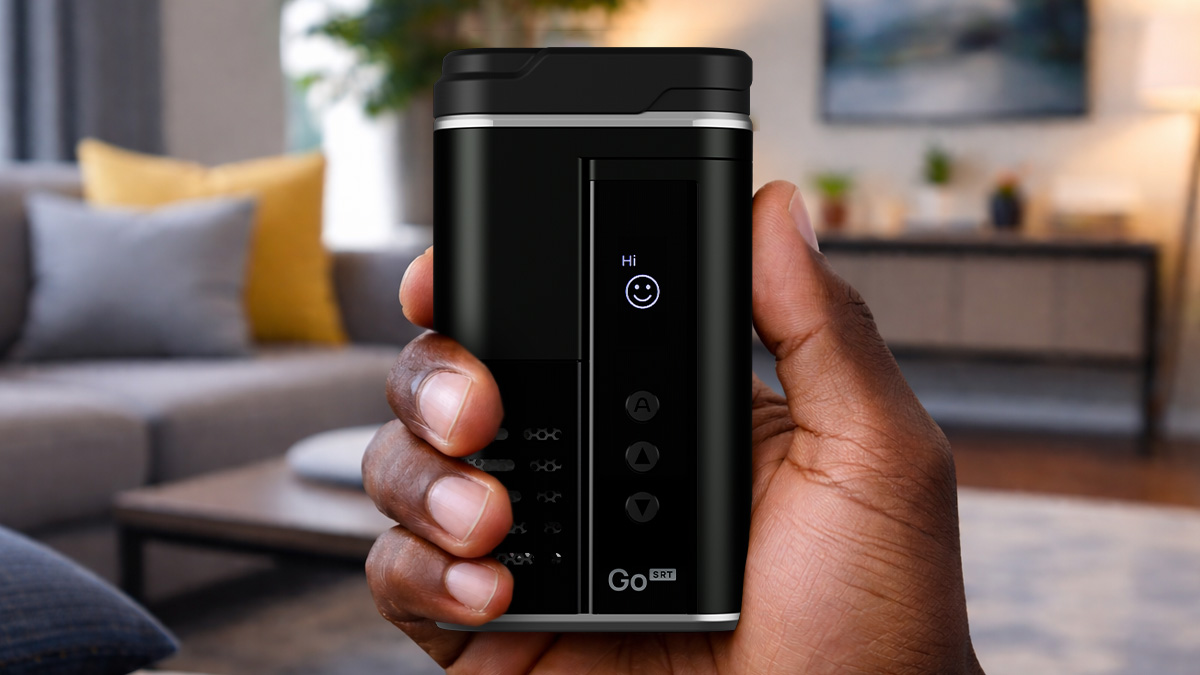
Rather than locking users into a single mode or rigid workflow, Go SRT provides a flexible control layer that adapts to how you actually use a Multi-purpose Heater. From precise digital temperature control to programmable presets and real-time session management, every setting exists to remove friction and put decision-making back in your hands.
What Are Go SRT Custom Session Settings?
Custom Session Settings on Go SRT go far beyond basic temperature adjustment. They form a unified system that lets you control not only how hot your session runs, but how it behaves from start to finish.
At a high level, these settings fall into three functional categories: core session controls, personalization & interface preferences, and programmable presets with real-time session management.
Core Session Settings: Temperature, Timing, and Interaction
At the heart of Go SRT customization are its core session settings—the controls that define how each session starts, runs, and feels from moment to moment.
Go SRT’s core session settings include:
- Precise digital temperature control to fine-tune heat in exact increments, allowing small adjustments that meaningfully affect flavor, vapor density, and extraction speed
- Selectable temperature units (Celsius or Fahrenheit) so you can work in the scale that feels most intuitive
- Session timing and auto shut-off controls to define how long a session remains active, helping reduce wasted heat, conserve battery life, and support intentional usage patterns
- Automatic display and control inversion to keep the interface readable and intuitive when the device is flipped for water filtration use with the WPA
- Adjustable display brightness to suit different lighting environments
- Customizable haptic and audio feedback so you can choose how communicative—or discreet—you want the device to be during use
Together, these core session settings create a stable, predictable foundation that allows every Go SRT session to feel deliberate, controlled, and tuned to your preferences.
Programmable Presets: Consistency on Demand
Presets are where customization becomes repeatable.
Go SRT allows you to create and save programmable presets that store preferred temperature and heat-time combinations. With a single selection, you can return to a familiar session profile without re-adjusting settings each time.
Programmable presets are ideal for switching between materials, different times of day, or distinct session styles—bringing consistency to every session.
Session Toggle: Real-Time Control Without Menus
Session Toggle is designed for moments when you want information or adjustments instantly.
With a quick interaction, users can check battery status, view remaining session time, or extend a session without navigating menus. This real-time access keeps attention on the session itself rather than the interface.
It’s a small feature that makes a meaningful difference in session flow.
Why Custom Session Settings Matter
For newer users, customization can feel optional. For experienced users, it’s essential.
Go SRT custom session settings allow you to build sessions around intention rather than habit, maintain consistency across environments, and adapt quickly without re-learning your device. Control becomes something you feel, not something you manage.
Conclusion: Control That Disappears When It’s Right
Customization shouldn’t feel technical—it should feel natural.
With its comprehensive Custom Session Settings, Go SRT delivers a level of control that supports experimentation, consistency, and confidence. Once everything is dialed in, the device fades into the background and the session takes center stage.
Explore the Go SRT Multi-purpose Heater and discover how Custom Session Settings, programmable presets, and real-time session controls help you dial in dry herb heating with vaporization as a function exactly the way you want—every time.
Other Links

Go Your Way: Go SRT Go Shells, Glass Aroma Tubes, and Session Flexibility
Published Date: April 17, 2026 Built Around Choice, Not Compromise One of the defining strengths of Arizer devices has always been choice—choice in temperature, session

Total Control with Go SRT: A Guide to Custom Session Settings
Published Date: April 15, 2026 Control That Adapts to You Performance is only meaningful when it’s repeatable. For advanced users, true control doesn’t come from
From Cold to Cloud: Why Rapid Heat Activation Changes the Vaping Experience
Published Date: April 10, 2026 What Is Rapid Heat Activation? Rapid heat activation refers to how quickly a Multi-purpose Heater reaches a stable, usable temperature
Go SRT Accessories Take Your Sessions to the Next Level
Published Date: April 1, 2026 Build Your Ultimate Go SRT Setup The Go SRT delivers speed, control, and tasty results right out of the box—but
Arizer Go SRT Overview: Design, Performance, and Everyday Use
Published Date: April 1, 2026 Where Speed Meets Control For experienced users, flavor chasers, and true connoisseurs, the question is no longer whether to heat